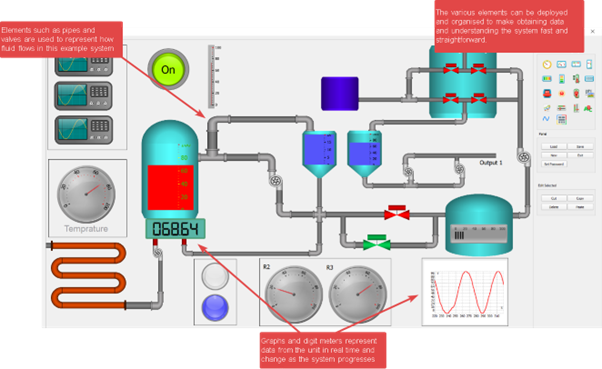
Drag-and-drop instrument widgets, live virtument panels, and real-time hardware control — all inside interactive LabDeck Notes
MatDeck’s Virtual Instrumentation (VI) framework enables engineers and scientists to design, deploy, and operate custom measurement, control, and monitoring systems — without traditional hardware programming.
Unlike rigid standalone software, MatDeck embeds virtual instruments directly into its live-document environment (LabDeck Notes), combining:
This creates a Virtument — a unified virtual instrument panel that behaves like physical lab equipment, but with full programmability and documentation in one place.
A Virtument (Virtual + Document + Instrument) is MatDeck’s signature concept: a live, executable document that functions as a full-featured measurement and control panel.
.exe or web app.TemperatureVirtument.mdd — Thermocouple data acquisition + PID control + live charting.OpticalsystemGUI2.mdd — Light intensity measurement with calibration curves and alarms.LabJack_PID_GUI_ALL.mdd — Full PID tuning panel with real-time scope, setpoint slider, and
auto-tuning.Micro:bit Comport Virtument — Serial communication with embedded sensors using widget-based UI.
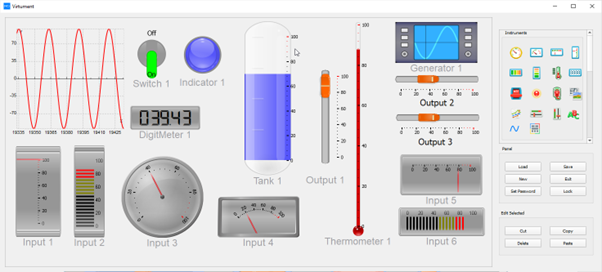
MatDeck includes a rich library of instrument widgets — pre-built UI components designed for engineering and lab use — that can be placed directly onto a LabDeck Note canvas.
Analog Gauge — Radial meters for voltage, temperature, pressure, etc.Digital Display — 7-segment or LCD-style numeric readouts.XY Plot / Oscilloscope Widget — Real-time waveform visualization with zoom/pan.Spectrum Analyzer Widget — FFT magnitude plots (leveraging CUDA/OpenCL via ArrayFire).Thermometer, Level Indicator, Bar GraphKnob / Rotary Encoder Widget — For setpoint or gain adjustment.Slider / Trackbar — Analog control (e.g., duty cycle, frequency).Push Button / Toggle Switch / LED Indicator — Digital I/O simulation and control.Waveform Generator Widget — Select sine, square, sawtooth, chirp with real-time parameter tuning.
Comport Widget — Serial (UART) monitor for Micro:bit, Arduino, sensors.Channel Selector — Dynamically assign DAQ channels (AI, AO, DI, DO).Status Panel — Device connection, error logs, sampling rate monitor.LabJack_AI0 or a slider to
Advantech_AO1.onValueChanged).
Embed executable blocks that tie widgets to hardware:
// MD Script: Real-time PID loop in Virtument
while (running) {
  double input = LabJack.readAI(0);      // Read sensor
  double setpoint = slider.getValue();   // From widget
  double output = PID.update(setpoint, input);
  LabJack.writeAO(0, output);           // Drive actuator
  scope.push([time, input, setpoint]);  // Update oscilloscope widget
  gauge.setValue(output * 100);         // % full scale
  wait(0.01); // 100 Hz
}Deploy EXE engine).
MatDeck Virtuments seamlessly interface with industry-standard DAQ and embedded systems:
| Platform | Features Supported |
|---|---|
| LabJack (T7, T4, UE9) | AI, AO, DI, DO, counters, PID control, thermocouple, RTD, database logging |
| Advantech | Buffered AI/AO, DI/DO (port & bit), PWM, real-time graphing |
| ICP DAS | SCADA integration, COM devices, DI/DO, Virtument GUI config examples |
| Micro:bit | Serial (COM port) data streaming, LED/matrix display control, sensor fusion |
device.readAI(channel),
not low-level registers.
Database Management engine