What Is MatDeck?
MatDeck is a next-generation technical computing environment developed by LabDeck, designed to eliminate the fragmentation inherent in traditional scientific workflows. Whereas engineers and researchers typically juggle MATLAB for computation, LabVIEW for DAQ, LaTeX for documentation, and Python for scripting — MatDeck integrates all these paradigms into a single, cohesive live document experience.
At its core, MatDeck uses MD Documents (.mdd) — dynamic files where narrative text, mathematical expressions, executable code, interactive GUIs, real-time plots, and hardware control logic coexist and interoperate seamlessly. Variables defined in a symbolic equation can be used in Python code, which drives a LabJack sensor, whose output updates a 3D plot — all within the same scrollable document.
Why “Ultra”? This Isn’t Just Another MATLAB Clone
MatDeck goes beyond computation: it bridges the gap between design, prototyping, deployment, and documentation. You don’t “export results to a report” — your report is the executable environment. This philosophy enables:
- Rapid iteration: Change a parameter → see math update → plot refreshes → hardware responds
- Reproducible research: Every result is traceable to its exact computational context
- Zero-context-switching: No alt-tabbing between IDE, terminal, and word processor
Core Architecture & Document Model
Understanding the MD Document — the foundation of all MatDeck workflows.
MD Document (.mdd)
The primary file format — a hierarchical, XML-based document that stores:
- Text blocks: Headings, paragraphs, bullet lists (rich text formatting)
- Canvases: Containers for computational objects (math, plots, tables, GUIs)
- Math objects: LaTeX-style equations with live evaluation
- Code cells: Python, C, or MD Script with syntax highlighting
- GUI widgets: Sliders, buttons, plots bound to variables
- Metadata: Author, version, variable states, dependencies
Documents support column mode (multi-column layout), bookmarks, variable navigation pane, and password-protected canvases for sensitive algorithms.
Mathematical Engine
A hybrid numerical/symbolic engine supporting:
- Symbolic math: Differentiation, integration, limits, series, equation solving (e.g.,
solve(x^2 - 4 = 0, x)) - Numerical computation: BLAS/LAPACK-optimized matrix ops, complex arithmetic, interval math
- Units system: Define
v := 5 m/s→ auto-converts inKE := 0.5 * 2 kg * v^2→25 J - Data types: Boolean, Integer, Double, Complex (
i), Vectors, Matrices, Tables, Strings, Equations, Intervals - Auto-evaluation: Formulas recalculate as you type (toggle per-object for performance)
Typical MatDeck Workflow
Programming Languages & Interoperability
MatDeck supports multi-language development with deep integration — not just calling external scripts, but sharing state across environments.
MD Script — The Native Language
A high-performance, C++-inspired language optimized for technical computing:
- Syntax familiarity:
for (int i=0; i - JIT compilation: Hot loops compile to native machine code at runtime
- Vectorized operations:
A .* B(element-wise),A * B(matrix) - Seamless math-object binding:
x = MathObject("x"); x.value = 42;
Vector x = {0, 1, 2, 3, 4};
Vector y = {1.1, 2.9, 5.2, 8.8, 13.1};
Function fit = polyfit(x, y, 2); // Quadratic fit
Plot2D(x, y, "o");
Plot2D(x, fit(x), "-");
Python Integration
Full embedded Python (CPython) interpreter — not a subprocess:
- Import
numpy,scipy,pandas,matplotlibdirectly - Call MatDeck variables:
md.x = 10→ accessible in Math object asx - Convert MatDeck matrices to NumPy arrays and back
- Use Python GUI frameworks (e.g., PyQt) alongside MatDeck GUIs
C / C++ & External Libraries
For performance-critical or legacy code:
- Compile C code into DLLs and call via
dllcall() - Link against BLAS, FFTW, OpenCV, or custom libraries
- Pass matrices by reference (zero-copy) for large datasets
- Debug C code using external IDEs (Visual Studio, etc.)
GUI Designer & Application Deployment
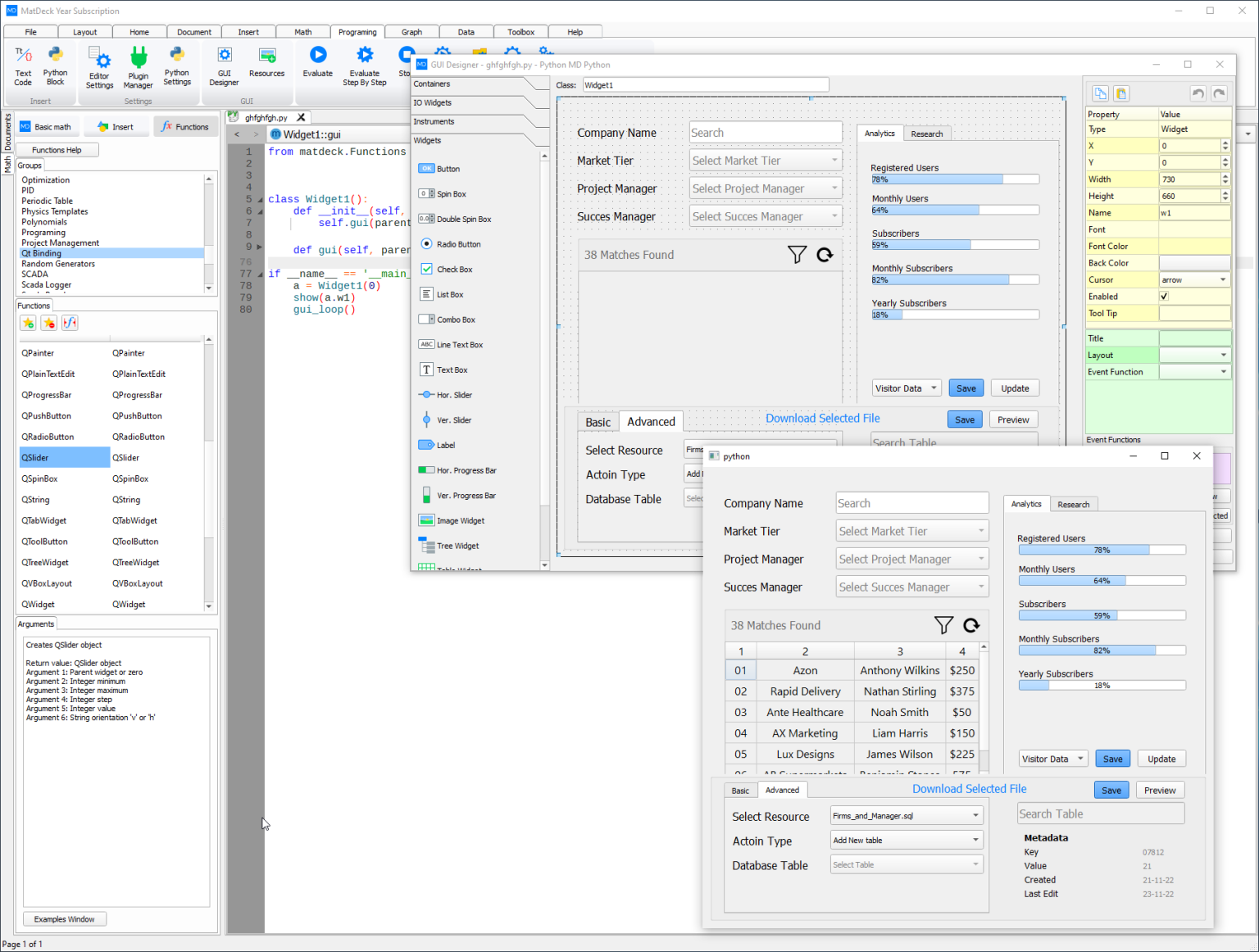
Drag-and-Drop GUI Builder
Visually construct interfaces inside MD Documents — no coding required for basic apps:
- 19+ built-in widgets: Button, Slider, Knob, Plot2D/3D, Meter, LED, TextEdit, ComboBox, Table, Image, Canvas, TabView, GroupBox, etc.
- Property inspector: Set min/max, labels, colors, bindings
- Data binding: Link slider to variable
frequency; plot auto-updates - Event handlers:
onButtonClicked() { acquire_data(); }in MD Script/Python - Export to code: Generate clean Python or MD Script for version control
Example: Virtual Oscilloscope for LabJack
- Canvas with two Plot2D widgets (Channel A/B)
- Sliders for timebase (ms/div) and voltage scale (V/div)
- Start/Stop buttons bound to DAQ control functions
- Real-time FFT display in a separate tab
🚀 Standalone EXE Deployment
One-click compilation to Windows executables:
- No runtime required: Bundles needed DLLs (15–40 MB typical)
- Performance: Compiled logic runs at near-C++ speed (verified via benchmark suites)
- License-free distribution: End users need no MatDeck license
- WebAssembly support: For browser-based dashboards (via ICP DAS integration)
- Installer packaging: Create NSIS/Inno Setup installers with icons, shortcuts
1. Design GUI & logic in .mdd
2. Menu → Build → Compile to EXE
3. Select target folder → "Build"
4. Distribute
MyApp.exe + MyApp_data/Data Acquisition & Industrial Integration
MatDeck’s DAQ subsystem is one of its strongest differentiators — designed for real-world lab and factory environments.
Hardware Support Matrix
| Category | Supported Devices & Protocols |
|---|---|
| DAQ Devices | LabJack (T4, T7, T7-Pro), National Instruments (NI-DAQmx), Measurement Computing, Advantech, generic USB/PCI DAQ |
| Industrial I/O | ICP DAS (I-7000, PET series), Modbus RTU/TCP, OPC UA, CAN bus (via adapters) |
| Audio & Sensors | Windows sound card (WASAPI), microphones, accelerometers, thermocouples (with signal conditioning) |
| Communication | Serial (RS232/485), TCP/IP, UDP, Bluetooth (SPP), MQTT (via Python) |
DAQ Workflow Features
- Real-time streaming: Acquire at 100 kS/s per channel (hardware-dependent)
- Multi-device sync: Trigger T7 and sound card simultaneously
- Custom triggers: Start on voltage > 5V, stop after 10 sec, or on digital pulse
- On-the-fly processing: Apply Butterworth filter → FFT → peak detection → log to SQLite
- Calibration tools: Linear/nonlinear correction curves for sensors
- SCADA/Virtument: Build HMI panels for factory monitoring
LabJack Example (T7): Configure 8 analog inputs at 10 kS/s, stream to circular buffer, trigger on digital rising edge, and plot live spectrogram — all with 12 lines of MD Script.
🔬 Research Lab Use Case: Vibration Analysis
A mechanical engineering team uses MatDeck to:
- Acquire 4-channel accelerometer data at 50 kS/s via LabJack T7
- Apply anti-aliasing filter and windowing in real time
- Compute FFT and identify resonance peaks automatically
- Generate PDF report with plots, parameters, and conclusions — all from the same document
- Deploy the analysis as an EXE for technicians to use on the factory floor
Domain-Specific Toolkits
📊 Signal & Image Processing
- FFT & Spectral Analysis: FFT, DFT, spectrograms, PSD, coherence
- Filter Design: FIR (windowed, Parks-McClellan), IIR (Butterworth, Chebyshev), adaptive filters
- Wavelets: Continuous/discrete wavelet transforms, denoising
- Image Tools: Thresholding, edge detection (Sobel, Canny), morphology, ROI analysis, batch processing
- OpenCV Bridge: Call
cv2.Canny()directly from Python cells
🧪 Chemistry & Education
- Chemical equation balancer:
balance("Fe + O2 -> Fe2O3") → "4Fe + 3O2 → 2Fe2O3" - Reaction stoichiometry: Compute yields, limiting reagents
- STEM templates: Pre-built labs for physics (pendulum), biology (population models), math (ODE solvers)
- Interactive homework: Students modify parameters → see real-time graph updates
📈 Statistics & Machine Learning
- Descriptive stats: Mean, std, skew, kurtosis, histograms
- Inferential tests: t-test, ANOVA, chi-square, non-parametric (Mann-Whitney)
- Regression: Linear, polynomial, logistic, nonlinear least squares
- ML modules: k-means, SVM, decision trees, neural networks (feedforward only)
- PCA & clustering: Dimensionality reduction for sensor fusion
Comparison & Editions
How MatDeck Compares to Alternatives
| Feature | MatDeck | MATLAB | LabVIEW | Python (SciPy stack) |
|---|---|---|---|---|
| Live Document (code + text + plots) | ✓ Native | ✓ Live Script | ✗ | ✓ Jupyter |
| Symbolic Math | ✓ Built-in | ✓ Symbolic Toolbox | ✗ | ✓ SymPy |
| GUI Designer (drag-and-drop) | ✓ Integrated | ✓ App Designer | ✓ Native strength | ✓ PyQT Designer |
| Standalone EXE Deployment | ✓ One-click, no runtime | ✓ Compiler (costly) | ✓ Native | ✓ PyInstaller (bulky) |
| Real-Time DAQ (LabJack, etc.) | ✓ Deep integration | ✓ Toolboxes | ✓ Native strength | ✓ Libraries (pylabjack) |
| Perpetual Licensing | ✓ Lifetime option | ✗ Subscription only | ✗ Subscription | ✓ Open source |
| Windows/macOS/Linux | ✓ Windows only | ✓ All | ✓ Win/macOS | ✓ All |
Editions & Pricing (UK, ex VAT)
| Edition | Key Features | Pricing |
|---|---|---|
| Free / Express | After 14-day trial: limited functions, no DAQ, no EXE export | £0 |
| MD Python Designer | Full Python integration, basic GUI, plots, math — ideal for data scientists | £76/year |
| Engineering Designer | Adds DAQ (LabJack), signal processing, control systems, EXE export | £84/year |
| Visionary Deck | Adds image processing, advanced ML, database tools, industrial protocols | £98/year |
| Full MatDeck (Lifetime) | All features + 1 year updates/support — perpetual license | £692 |
💡 Strategic Advantage
For a university lab or small engineering firm, MatDeck’s lifetime license (£692) can replace:
- MATLAB + Symbolic Math Toolbox + Compiler (~£3,000+/year)
- LabVIEW Base + DAQ Module (~£2,500)
- Separate documentation tools (LaTeX, Word)
ROI achieved in under 6 months for teams doing mixed computation/hardware work.